
Every platform has a wall. On one side are the features it ships with. On the other side is everything you actually need that nobody built yet — the odd integration, the specific report format, the rule that's just a bit too custom. Normally, crossing that wall means hiring a developer and waiting. The Builder Assistant is Mihu's way through it: you describe what you need in one sentence, and it writes the real code, deploys it as a running service, and hands you a live URL.
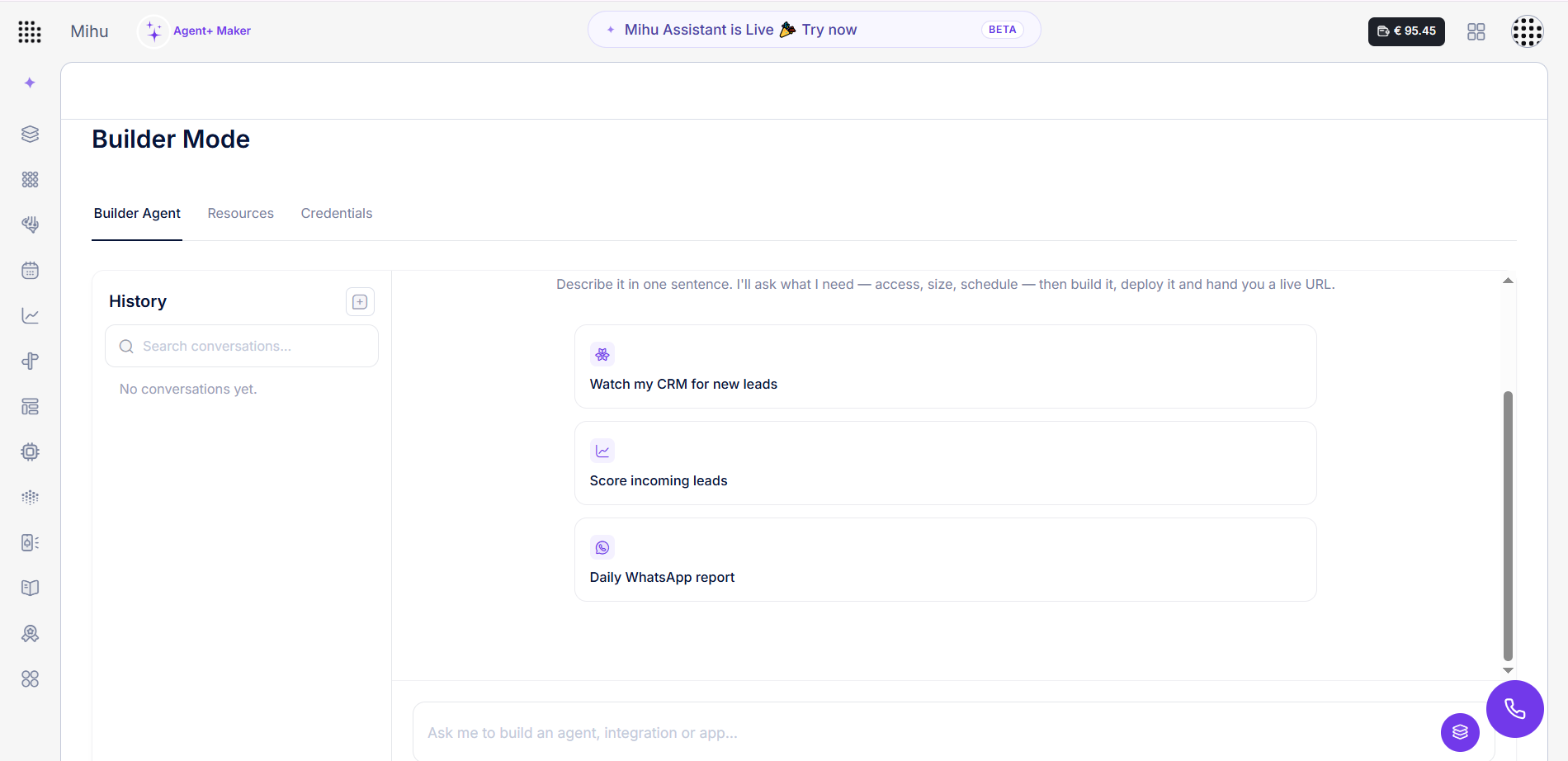
"Watch my CRM for new leads and post each one to our webhook as JSON." "Automatically segment my contacts and trigger a follow-up for the warm ones." "Send me a daily WhatsApp report of yesterday's calls." None of those is a button in Mihu. All of them are one sentence to the Builder — which then goes and builds the software that makes them true.
What the Builder Assistant is
The simplest way to say it: the Builder Assistant is an AI software engineer that works from a sentence. The everyday Mihu Assistant — the copilot from Day 1 — operates the things Mihu already knows how to do, like creating and updating agents, connecting channels, launching campaigns, and pulling reports. The Builder is different. It doesn't press existing buttons; it writes brand-new software when the thing you want doesn't exist yet.
You describe an outcome. It asks what it needs — access, size, schedule — the way a good engineer would. Then it writes the code, runs its own review and quality checks, deploys it as a real service with its own computing power, and gives you a live URL to use. Think of it less like a feature and more like having a developer on staff who never sleeps and works entirely in plain language. You never open, read, or maintain a line of code.
The Assistant runs Mihu's features. The Builder writes new ones.
When your request is something Mihu can already do, the Assistant handles it. When it needs new software to exist first — a custom integration, a bespoke automation, a data feed in your exact shape — the Builder writes and ships it. Same chat, two layers.
Assistant vs. Builder: where the line is
This is the distinction that matters, so it's worth making it concrete. If the job is running the platform, it's the Assistant. If the job is creating something the platform doesn't offer, it's the Builder.
Mihu Assistant — runs the platform
- Creates and updates your agents
- Connects channels and launches campaigns
- Pulls the built-in reports and summaries
- Operates features that already exist
Builder Assistant — writes the software
- Writes real code for custom integrations
- Builds automations that aren't built-in
- Delivers data in the exact shape you need
- Deploys it as a live service with a URL
What it builds
The Builder shines exactly where a template would normally give up. A few of the shapes that work takes:
Custom integrations
Connect Mihu to any system — a CRM like Zoho, an in-house database, a legacy tool with no standard connector. The Builder writes the integration code and deploys it as a service.
Data in your exact shape
Need leads delivered to your webhook as a specific JSON payload? The Builder writes custom code that transforms and posts the data exactly how your system expects it.
Automations that aren't built-in
Automatic segmentation is a great example: the Builder writes a small program that runs your checks on your contacts, builds the segment, and triggers the right flow — something Mihu doesn't do out of the box.
Scheduled reports & pipelines
A daily WhatsApp report, a nightly export, a weekly compile in a required format — the Builder ships a scheduled job that runs itself and delivers on time.
Custom logic & scoring
Score incoming leads on your own factors, apply routing rules no template covers, run any bespoke logic — deployed as a service that acts on every new record.
Small apps & endpoints
A booking page, an intake form, an internal dashboard, an endpoint your website can call — built, deployed, and handed to you as a live URL.
See it in action
A few real requests and what the Builder does with them.
Things real teams build
The same coding layer takes a different shape in every industry. Here's the kind of software it ships for the businesses Mihu serves.
Automotive · connect the DMS
A dealership's records live in an in-house system with no standard connector. The Builder writes an integration so agents can read overdue-service customers and write appointments back — both ways, deployed and running.
Healthcare · a custom intake feed
A clinic needs call outcomes pushed to its patient system in a precise format. The Builder writes a pipeline that transforms each result into the required JSON and posts it — no manual re-entry.
E-commerce · auto-segment & trigger
Segment customers by behaviour — abandoned cart, repeat buyer, lapsed — and trigger the right message flow for each. The Builder writes the software that runs the checks and fires the actions.
Real estate · a lead-scoring service
Score every incoming lead on budget, location and urgency, then route the hottest straight to the right agent. The Builder deploys the scoring service that acts on each new lead automatically.
Financial services · a compliance export
A scheduled job that compiles the required daily figures in the exact layout a regulator or head office expects, and delivers them on time — built once, running on its own.
Hospitality · a booking mini-app
A booking page on your own domain that feeds straight into Mihu and keeps your calendar in sync. The Builder ships the app and hands you a live URL to drop on your site.
The pattern is always the same
In every one of these, nobody opened a code editor, briefed a developer, or waited on a sprint. Someone described a result in a sentence, and the Builder wrote the software, tested it, and shipped it. The work that used to be a project becomes a message.
Inside Builder Mode
Builder Mode lives in your dashboard and has three simple parts: the Builder Agent you talk to, the Resources where everything it ships actually runs, and the Credentials that keep it all secure.
1. The Builder Agent — describe, and it builds
You start with a sentence: "Ask me to build an agent, integration or app." The Builder asks what it needs — access, size, schedule — then writes the code, deploys it, and hands you a live URL. A history panel keeps every build so you can revisit or reuse it.
2. Resources — real, running services
Everything the Builder makes runs as a genuine service with its own computing power, a versioned snapshot, and automated Review and QA checks it must pass before going live. You see each one's state and its transparent hourly cost, and you can start or stop any of them.
| Name | State | Checks | Snapshot | Resources | Use case |
|---|---|---|---|---|---|
| zoho-lead-sync | Stopped | Review: Passed QA: Passed | minders/zoho-lead-sync-a894e1c7 | 1 vCPU · 1 GiB · 3 GiB €1.67 · €0.0794/hr |
Integration |
| json-webhook-export | Stopped | Review: Passed QA: Passed | minders/json-webhook-export-cfba71a | 1 vCPU · 1 GiB · 3 GiB €0 · €0.0794/hr |
Data feed |
| contact-auto-segment | Stopped | Review: Passed QA: Passed | minders/contact-auto-segment-dd201b4 | 1 vCPU · 1 GiB · 3 GiB €0 · €0.0794/hr |
Automation |
| daily-whatsapp-report | Stopped | Review: Passed QA: Passed | minders/daily-whatsapp-report-cd036d0 | 1 vCPU · 1 GiB · 3 GiB €0 · €0.0794/hr |
Data pipeline |
| mini-crm-web | Stopped | Review: Passed QA: Passed | minders/mini-crm-web-1ff80c9 | 1 vCPU · 1 GiB · 3 GiB €0 · €0.0794/hr |
Web app |
3. Credentials — secure by design
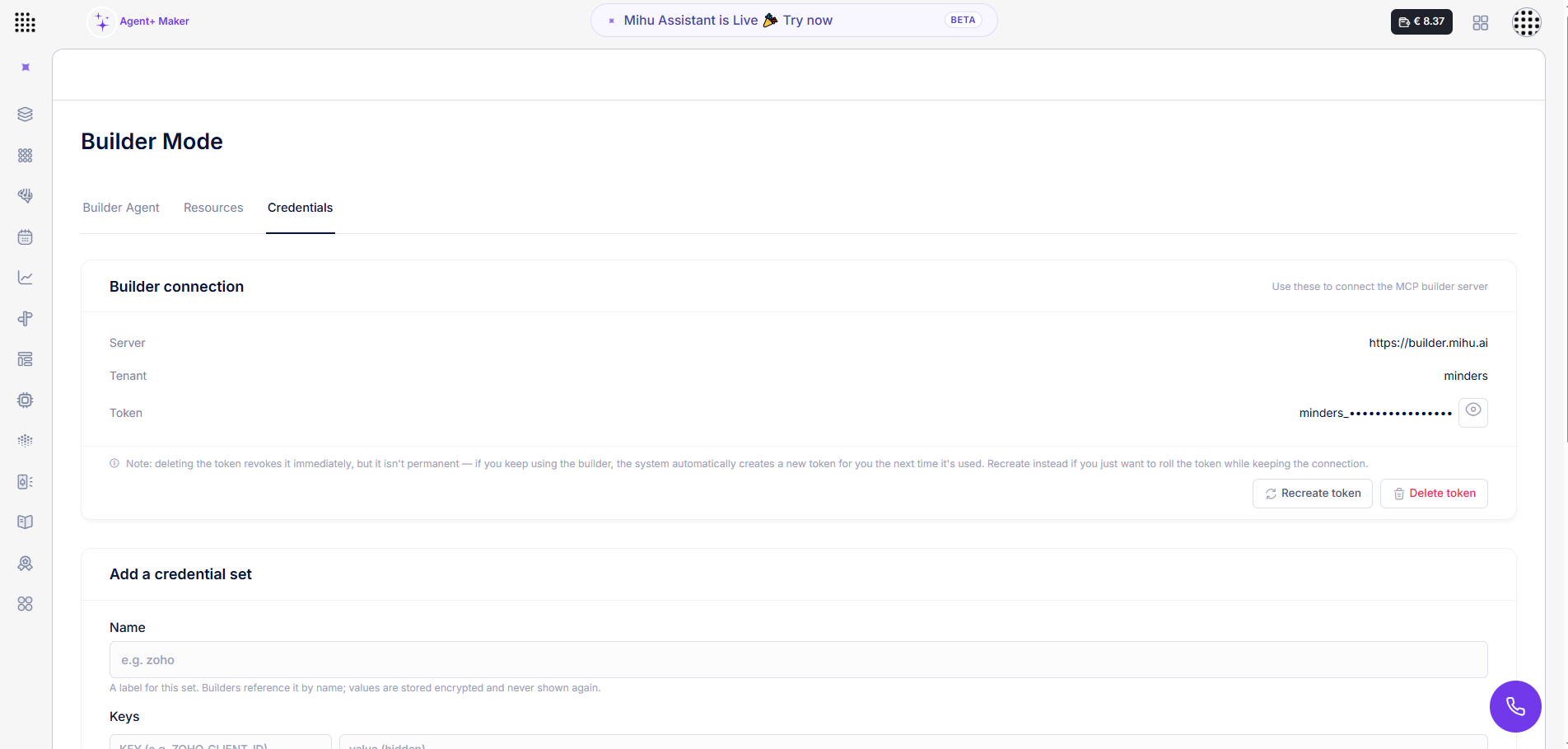
When a build needs access to another system, you add a credential set by name — say a Zoho client ID and secret. Values are stored encrypted and never shown again; the Builder references them by name only. The same tab holds your Builder connection — a server, tenant and token — so you can connect the MCP builder server and drive the Builder from outside the dashboard too.
You describe it; the machine engineers it
Writing, testing, deploying, securing, and running the software is entirely the Builder's job. Yours is to say what you want. If you can describe it, it can build it.
Why it changes the work
- No developer queue. The custom integration or automation that used to mean weeks of engineering now ships while you're still in the chat.
- The right person describes it. Whoever understands the need states it in plain language — no translating requirements into a spec for an engineer.
- "Not a built-in feature" stops being a dead end. If Mihu doesn't do it out of the box, the Builder writes software that does.
- It's transparent and reversible. Every build is a real service you can see, price, pause, or remove — with Review and QA checks on the record.
The Builder Assistant is Day 4 of our launch week. If you're catching up: Day 1 introduced the Mihu Assistant, and Day 3 opened it up to WhatsApp, SMS and email channels. The Builder is the layer that goes furthest — the one that writes whatever the others don't already do.
Frequently asked questions
What is the Builder Assistant?
The coding layer of Mihu. You describe what you need in one sentence and it writes the actual code, deploys it as a real running service, and hands you a live URL. It builds the things that aren't built-in features: custom integrations, custom automations, data pipelines, and small apps.
How is the Builder different from the Mihu Assistant?
The Mihu Assistant operates features Mihu already has — creating and updating agents, connecting channels, launching campaigns, pulling reports. The Builder writes brand-new software for things Mihu doesn't do out of the box. The Assistant runs existing features; the Builder writes and deploys new ones.
What can it actually build?
Custom integrations to any system, automations that aren't built-in such as automatic contact segmentation with triggered flows, data delivered as a custom JSON payload to your webhook, scheduled reports and pipelines, lead-scoring services, and small web apps and endpoints — each deployed as a real service with a live URL.
Do I need to code, or host anything?
No. You describe the outcome and the Builder asks what it needs — access, size, schedule — then writes, tests, and deploys the code. Everything runs on Mihu's own compute under the Resources tab, with transparent hourly cost. You never write code or provision servers.
How are credentials and quality handled?
Credential sets are added by name and stored encrypted — values are never shown again, and builds reference them by name. Every service the Builder ships passes automated Review and QA checks, shown against each resource, before it runs.
Can I connect it to external assistants?
Yes. The Credentials tab gives you a Builder connection — a server URL, tenant and token — to connect the MCP builder server, so you can drive the Builder from external AI assistants and wider workflows, not just from inside the dashboard.
If you can describe it, it can build it.
Open Builder Mode and tell it what you need — your first integration, automation, or app is one sentence away.
Try the Builder Assistant Built into every account · €30 free credit to start · No code, pay only for what runs