Changelog

We ship updates to Mihu Loop and the Mihu AI platform roughly every two weeks. For everything in between, follow us on LinkedIn.

Desktop App

Use Mihu Loop Directly on Your Computer

See Details
  • Native desktop app: for macOS, Windows and Linux — the download page detects your system and gets you the right build automatically.
  • Live in seconds: install, sign in, and your queues, conversations and tickets are exactly where you left them.
  • Always current: Mihu Loop checks for new versions on its own, so you're never behind.
Ticketing

Tickets: Opened Automatically, Routed to the Right Person

See Details
  • Auto-classified: tell your Observer agent in plain language what should count as a complaint or an opportunity in Settings, and every ticket gets tagged and scored against that.
  • Auto-routed: sent to the same queue or team member the conversation itself would have reached — unassigned and ready if nobody specific fits.
  • Linked to the conversation: every ticket opens straight back to the original call or thread, no searching required.
  • List or Kanban: Open, In Progress, Waiting on Customer, Resolved, Closed — filter by priority, tag, source, or who's holding it.
app.mihu.ai/tickets
Tickets (5)
List Kanban
OPEN2
#7 Normal AI · 84%
Customer interested in financing a 2026 XC90
● Opportunity
Unassigned7h ago
#6 Normal AI · 93%
Customer requesting trade-in value for a 2019 sedan
● Missing Info
Unassigned13h ago
IN PROG.2
#5 High AI · 91%
Financing pre-approved by AI — awaiting finance manager credit sign-off
● Opportunity
Finance Manager2h ago
#4 Normal Manual
Customer unhappy — loaner car not ready at pickup
● Complaint
Demo Account23h ago
WAITING1
#8 Normal AI · 86%
Customer comparing lease vs. finance before deciding
● Opportunity
Unassigned7h ago
RESOLVED0
No tickets here
CLOSED0
No tickets here
Contact Center

Knowledge, Copilot, Autopilot, and Human in the Loop

See Details
  • Autopilot — the AI agent sends: it retrieves, writes and sends the reply itself, with every step on the record.
  • Copilot — it drafts, your team sends: the AI agent writes the whole reply, then stops at your team member's screen as an AI draft.
  • Say Next on live calls: the AI agent listens on the line and feeds your team member the next line to say, without ever speaking itself.
  • Take over, hand back: control can move between the AI agent and a team member in both directions, mid-conversation.
Knowledge Library · Company knowledge base
‹ All tables Stock Data 16,851 records Updated 2 Sep
🔍 estate 2.0 diesel
MatchBrandModelUpdated
0.86VolvoV60 D42026-09-01
0.81VolvoV90 D52026-09-01
0.64VolvoXC60 B42026-08-28
0.31VolvoXC90 Recharge2026-08-28

Sixteen thousand rows, and a score on every one of them. That score is the whole product.

Contact Center

LOOP: The Contact Center Where AI Agents Are Colleagues

See Details
  • One inbox, seven channels: every channel lands on the same desk, so nobody switches tabs to keep up.
  • Three modes, one switch: Autopilot, Copilot and Human First, set per queue, per channel, or per conversation from the header.
  • Voice, live: the AI agent joins the call itself and works alongside the team member on the line.
  • Escalations you cannot miss: a distinct state for every reason an AI agent hands a conversation back.
ModeWho does whatUse it for
AutopilotMihu AI handles the conversation and sends the replies itself, and hands off to a team member the moment your rules say so.Repeat questions: order status, invoices, hours, rebooking
CopilotThe AI agent drafts and suggests; you approve, edit and send. Anything touching money or a commitment waits for approval.Sales, and anything with a policy edge
Human FirstYou handle it; the AI agent stays silent, with suggestions on demand.VIP accounts, safety, complaints

Set the mode on a queue, on a channel, or on one conversation. The customer never sees the switch.

Team & Routing

Team, Roles, Logs, Queues, and Smart Routing

See Details
  • Roles and scopes: bundle the exact permissions a job needs into one role, instead of ticking boxes for every new arrival.
  • Access logs: every request logged with the time, the member, the path they opened, and whether it went through.
  • Queues with SLA, flow and hours: set how fast, what happens off-plan, and when the lights are on, per queue.
  • Smart routing: rules of your own decide exactly where a call or message goes the moment it arrives.
SalesCAWASM4 agentsSLA 30s
SupportCAWAEM6 agentsSLA 60s
BillingEMIG2 agentsSLA 5min

Every queue in one line: its channels, its agents, its target and its rules.

Security & Identity

Domain, Security, and Identity

See Details
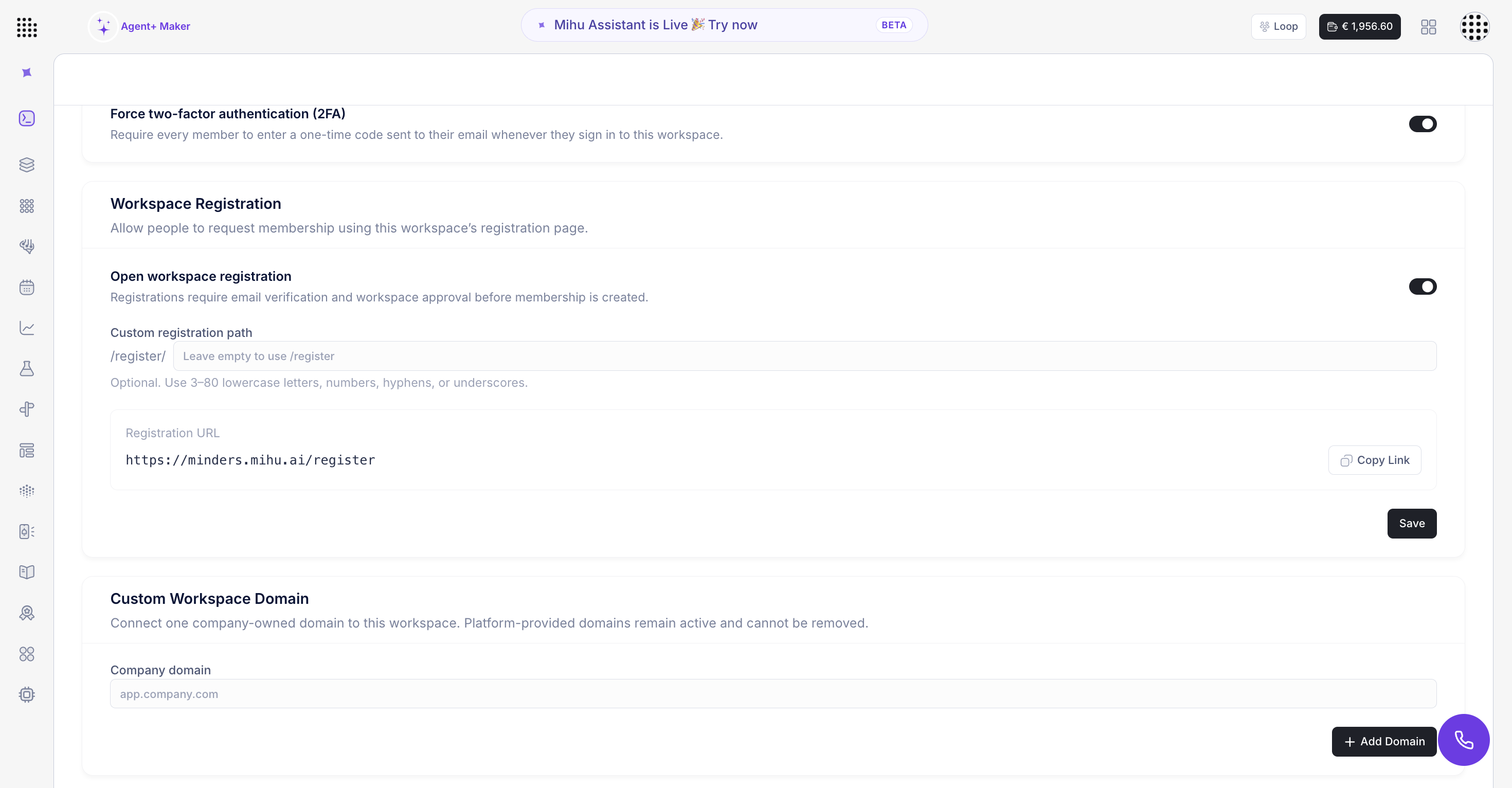
  • Your own domain: point an address you own, like app.yourcompany.com, at your workspace.
  • Workspace-wide 2FA: one switch turns on two-factor authentication for everyone in the workspace at once.
  • Hand out keys, not copies: publish a registration link and approve every access request yourself.
  • Put your name on it: swap the logo so your team opens a workspace that looks like yours.
Mihu workspace 2FA, workspace registration, and custom domain settings
Integrations

Mihu AI Is Now on Zoho Marketplace

See Details
  • Actions on the lead record: call, send a WhatsApp template, or add to a campaign in one click, without leaving the CRM.
  • Automatic logging: every call and message is written back as a note automatically, with outcome, content and timestamp.
  • Minutes to set up: connect your workspace subdomain and API token, choose your agents — no code required.
Mihu AI actions menu on a lead record inside Zoho CRM